Embracing the Rewards Banking Lifestyle

In September we debuted a new product that seems to have taken on a life of its own. It has generated so much excitement that we have coined a new term: the Rewards Banking Lifestyle.

A Rewards Banking Lifestyle is the realization that every day choices can generate benefits for you in the form of UChoose® Rewards Points, redeemable for things you need and want. It’s when you think twice before using a different way to pay because your VCNB Rewards Checking Account gives you so many reasons to use VCNB products and cards.

If you are like the average American, you are already spending money. You’re paying the electric bill, buying groceries, filling your gas tank and buying shoes for your growing kids. What are you getting in return for spending your own money? Chances are you’re getting nothing except the satisfaction that your bills are paid and your family is fed.

When you are a VCNB Rewards customer, you have potential to earn rewards points for lots of your everyday banking habits. Rewards Checking customers earn points for dollars spent when they swipe their card for PIN and Signature purchases. They earn points for using Direct Deposit, Online Bill Pay, the Visa Platinum® Favor Card and other VCNB products. Essentially, customers who take advantage of our products will earn points each time they spend their money, pay a bill, get paid by direct deposit or pay a VCNB loan.

Rewards Checking Chart- Flier for new accounts

We recently talked about the amount of points an average customer might receive in a month. Click here to read that story.

Many of our customers like to receive cash back. Others enjoy receiving gift cards, travel experiences, event tickets and even merchandise. There is an extensive UChoose® Rewards Store that offers a variety of items.

Our employees began testing Rewards Checking a few months before we released it to the rest of our customers. We notice that many of them are taking full advantage of their point earning potential and looking for additional ways to earn more. In a lot of ways, they have pioneered the Rewards Banking Lifestyle.

A Rewards Checking Account, like all of our accounts, can be opened online or in any of our seventeen locations.

Click here for complete information on this account including fees and terms and conditions.

Earn More Points With Rewards Checking

Holiday shopping is in full swing and a lot of our Rewards Checking customers are having fun watching their UChoose® Rewards Points balance rise. In case you didn’t know, there are a number of special point earning opportunities to be found on the UChoose website. In fact, many vendors have special offers, some of which do need to be activated. These points are in addition to the ones you already are earning just for swiping your debit card when you spend.

These offers require activation:

CVS Pharmacy – Earn two points per $1 at CVS Pharmacy on purchases of $50 or more (maximum 10,000 Points). Offer valid through 12/31/2015. Points are added to your account within 30 days of the date of purchase.

Kohls – Earn two points per $1 at Kohl’s on purchases of $25 or more (maximum 10,000 points). Offer valid through 12/31/2015. Points cannot be earned when purchasing gift cards. Points are added to your account within 30 days of the date of purchase.

Papa John’s – Earn five points per $1 at Papa John’s on purchases of $25 or more (maximum 10,000 points). Offer valid through 12/31/2015. Points cannot be earned when purchasing gift cards. Points are added to your account within 60 days of the date of purchase.

When you login to your UChoose account, click on “Earn Points” in the bar on the left. In the drop down menu that appears, click on “Activate” to see the list of current offers. Also, be sure to read the offer details so that you can take full advantage of the offer and don’t forget to click the “Activate” button while you’re at it.

There are also lots of offers that don’t require activation. You just automatically receive the points when you make a purchase. To find the complete list, click on “Earn Points” on the left side of the screen inside your Uchoose account and look for “All Offers” in the drop down menu.

Learn more about Rewards Checking by clicking here.

Register your Rewards Debit card or Visa Platinum Card to begin earning points by clicking here.


Customer Perspective: Apple Pay™

There has been a lot of buzz about Apple Pay™ here at VCNB since we became a participating bank. We thought you might like to hear some of the things our customers are saying.

Security is King
In this day and age where data and identity theft are on the rise, the security and privacy that come with Apple Pay are difficult to rival. Your card number is never stored on your device and when you pay, your card number is never sent to the merchant. Instead, Apple Pay assigns a unique number for each purchase so your payments truly stay private and secure. This means the merchant has no access to your information and there is no risk of your card being skimmed during the transaction.

Customers who use Apple Pay say they appreciate this advanced security!

Easy as Pie
It’s convenient and easy! Simply hold your phone near the reader and the machine recognizes how you want to pay. There’s no app to open or hoops to jump through.

Life in the Fast Lane
One customer argues that it’s a faster way to pay. In addition to processing as fast or faster than a typical card transaction, he said that it is quicker than pulling his wallet from his pocket and finding the right card. After all, an iPhone user typically has their phone at their fingertips! That means you can be checked out and on your way faster, leaving more time for what you really want to do.

To use Apple Pay, you need to have iPhone 6, iPhone 6 Plus, or Apple Watch 5 or 6 running on iOS 8.1 or later for contactless and in-app payments. You can use iPad Air 2 and iPad mini 3 for in-app payments only. Apple allows up to eight cards on a device – not that you’ll need any more than your VCNB debit and credit cards! Click here to learn more about participating merchants and how to get started.    


Leverage holiday shopping to earn UChoose® Rewards Points

Ready or not, here it comes. The holiday season is just about here. A lot of retailers are already decorated and getting started on early sales. We always feel a little guilty about discussing Christmas before Thanksgiving but we feel a duty to help our customers prepare for this very expensive season before it arrives. After all, if you wait until December to save money and plan for Christmas, it will be too late.

Today we’re talking about how our Rewards customers can leverage more points during the holiday season. Our customers who are earning UChoose® Rewards Points with their Platinum Visa® card or Rewards Checking can earn points redeemable for gift cards, cash back and items each time they swipe these cards.

Platinum Visa customers will earn one point for every dollar they spend while Rewards Checking customers will earn one point for every three dollars when they swipe their card. Since Christmas is such an expensive time of the year, this is a great time to watch those rewards points add up.

Think about all the money you spend during the holidays. Most folks spend far more than they think when they add up all the extra things they do and buy between Thanksgiving and New Years. All that money you spend on making the holiday merry and bright could add up to something nice for you after the holiday!

Our friends at Nerd Wallet did extensive research last year and determined the average cost of Christmas spending per American city. In Columbus, the average family of four was expected to spend an average of $842.76. That’s for presents, food, holiday cards, decorations – the whole Christmas shebang. Click here to read the whole study.

Contact your local office to apply for a VCNB Platinum Visa card.* Also, if you are interested in opening a new Rewards Checking account or converting an existing checking account to this type of account, you can open in-office or online. At this time, we are even offering a promotion that offers bonus points to get you started. Learn more here.

*Credit restrictions apply.

Have you tried VCNB Mobile?

Have you tried VCNB Mobile? We’ve had a mobile app for some time now but introduced a new and improved app earlier this year. We couldn’t be happier with how easy the app is to use or how customers are reacting to it.

With VCNB Mobile, you will find streamline access to your account information, literally at the tip of your fingers. Once you login, you can view account balances, transfer funds, send funds with Popmoney® Personal Payment Service and pay bills with Online Bill Pay. You can also deposit checks using mobile deposit.

No matter where you go in the world, if you have a mobile device with data or internet service, you can bank with VCNB. Popmoney to your buddy from the movie theater line, transfer funds from the breakfast table and deposit a check on a rainy Monday when you just don’t feel like going to the bank.

It’s easy, quick and convenient.

Ready to get started?

To install VCNB Mobile, visit your phone or tablet’s app store and download VCNB Mobile. When prompted, enter your online banking username and then answer the online banking security questions you set when you registered for online banking. Then enter your Online Banking password! It’s easy and quick to get started and simple to use!

Want to learn about more VCNB products and the things we can do for you? Click here to get started!

Prepare For The Holidays With A Christmas Club

Santa Holding Stack of GiftsThere are two types of people in this world: those who prepare for holidays well in advance and those who don’t. If you’re like millions of Americans, you probably wait until November or December to panic over what presents to buy for Christmas and how to pay for it all.

On the other hand, if you had a VCNB Christmas Club, you could be saving a little money each month and receive a nice sum in October, just in time for holiday sales. However, if holiday saving isn’t your thing you can use a Christmas Club to save for other things. There’s no rule that says you can’t save your funds for a vacation, a new car, home repairs or just for the sake of saving for the future.

A lot of folks lack the self-discipline to save regularly on their own. The beautiful thing about Christmas Club is that we automatically transfer the funds from your checking or savings account into a Christmas Club account. You can access those funds in an emergency but the $20 fee for doing so should be enough of a deterrent you won’t be tempted to withdraw funds for a silly reason.

Best of all, you decide how much you want to save each year and we do the rest. We will divide your savings goal by twenty-six and transfer that amount into your Christmas Club every two weeks throughout the year. Then in October, your funds will be direct deposited into the checking or savings account you designate.

There is no set amount for Christmas Club. We have customers who save as little as $250 a year and others who save thousands.

Ready to get started? Stop by your local branch or click here to open an account today!

Retailer Specials Increase Points Earning Potential

So you have a Rewards Checking and a VCNB Platinum Visa® Card and are eager to earn UChoose® Rewards Points. Did you know there are special point earning opportunities on the UChoose® website?

Many vendors have special offers that must be activated from your UChoose online account. These points are in addition to the points you will earn for simply swiping when you spend. Here are just a few:

Kohls – Earn two points per $1 at Kohl’s on purchases of $25 or more (maximum 10,000 points). Offer valid through 10/31/2015. Points cannot be earned when purchasing gift cards. Points are added to your account within 30 days of the date of purchase.

Papa John’s – Earn five points per $1 at Papa John’s on purchases of $25 or more (maximum 10,000 points). Offer valid through 10/31/2015. Points cannot be earned when purchasing gift cards. Points are added to your account within 60 days of the date of purchase.

Budget Rent A Car – Earn twenty points per $1 at Budget Rent A Car (maximum 10,000 points). Offer valid through 10/31/2015. Points cannot be earned when purchasing gift cards. Points are added to your account within 60 days of the date of purchase.

AMC Theatres – Earn ten points per $1 at AMC Theatres on purchases of $25 or more (maximum 10,000 points). Offer valid through 10/31/2015. Points cannot be earned when purchasing gift cards. Points are added to your account within 60 days of the date of purchase.

When you login to your UChoose account, click on “Earn Points” in the bar on the left. In the drop down menu that appears, click on “Activate” to see the list of current offers. Also, be sure to read the offer details so that you can take full advantage of the offer and don’t forget to click the “Activate” button while you’re at it.

There’s also a heap of offers that don’t require activation. You just automatically receive the points when you make a purchase. Here are a few of those too.

AutoZone.com                        8 Points
BedBath&Beyond.com           4 Points
Cabelas                                  3 Points
DirectTV                                 10500 Points per activation
DisneyStore.com                    5 Points
ElizabethArden.com               5 Points
HomeDepot.com                    3 Points
iTunes                                    6 Points
Kate Spade                            6 Points
LandsEnd.com                       4 Points
Magazines.com                      20 Points
New Balance                          6 Points
NewYork&Co.com                  5 Points
NikeStore.com                        7 Points
Philosophy.com                      5 Points
Walgreens.com                      7 Points

To find the complete list, click on “Earn Points” on the left side of the screen inside your Uchoose account and look for “All Offers” in the drop down menu.

Learn more about Rewards Checking by clicking here.

Register your Rewards Debit card or Visa Platinum Card to begin earning points by clicking here.

Apple Pay™ Is Here!

Apple_Pay_logo_svgMany of you have asked for it and it’s finally here! Now you can use your VCNB debit and credit cards to make purchases with Apple Pay™. The contactless payment technology of Apple Pay is both convenient and safe, making this new technology a revolutionary way to pay in person and in apps.

Instead of reaching for your wallet, you can just tap your device at the cash register and wait a moment for the payment to process.

Your information isn’t stored on your device and, while the retailer receives their payment, they do not receive your personal information. Instead, Apple Pay assigns a unique number for each purchase so your payment information always remains private and secure. There are additional security measures in place including a way to delete cards if the device is lost or stolen. All told, Apple Pay makes spending far safer than carrying around a wallet full of cards.

In order to use Apple Pay, you need to have iPhone 6, iPhone 6 Plus, or Apple Watch 5 or 6 running on iOS 8.1 or later for contactless and in-app payments. You can use iPad Air 2 and iPad mini 3 for in-app payments only.

Apple allows up to eight cards on a device – not that you’ll need any more than your VCNB debit and credit cards! Click here to learn more about participating merchants and how to get started.

Get Rewards. Be Like Jim.

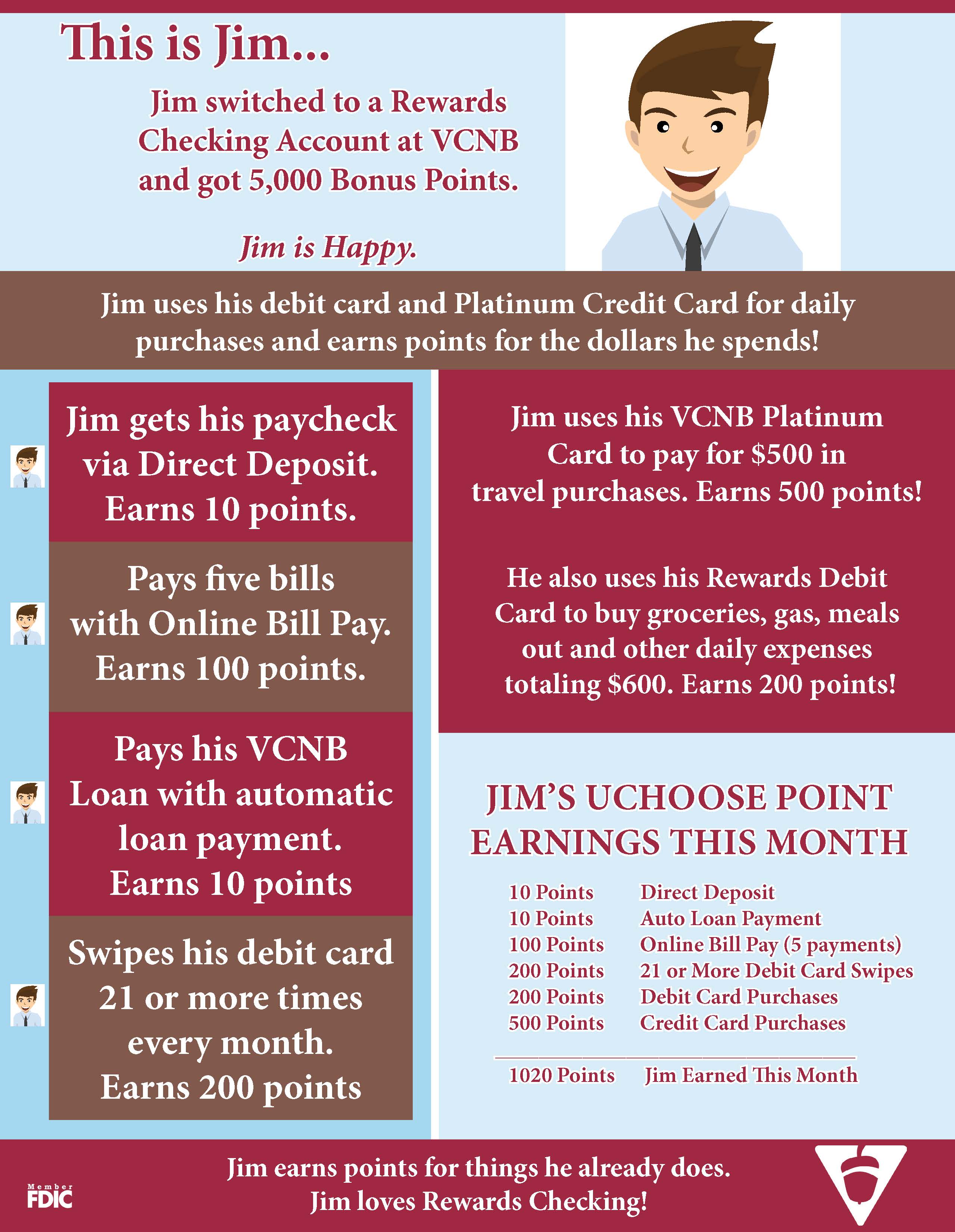
Today we’re looking at how an average customer might accumulate UChoose Rewards® Points with Rewards Checking at VCNB. Customers who are using this account say that it has been easy to earn points by simply doing what they already do in terms of spending and banking habits.

See below to meet Jim and learn how he earns points every month. Jim spends with his debit card and Visa® Platinum Card, uses Direct Deposit and other bank products. As a result, Jim sees his UChoose Rewards Point balance increasing steadily.

By signing up for Rewards Checking before December 31, 2015, Jim even receives 5,000 bonus points to kick start his point savings.

Visit http://www.vintoncountybank.com/rewardschecking/ to see full terms and conditions as well as fees associated with Rewards Checking.

Visit http://www.vintoncountybank.com/rewardschecking/ to see full terms and conditions as well as fees associated with Rewards Checking. Click image to enlarge.

Many of our customers and employees use Rewards Checking and have been thrilled with this new account. We encourage you talk to others who have Rewards Checking accounts and read up on the account by clicking here.

At this link you’ll find complete account details including ways to earn points, fees and other information you may find helpful. You can open a new account online or in office. If you are an existing VCNB customer, please contact your local office to have your account type changed.

What You Need To Apply For A Mortgage

You’ve found your dream home and now is the time to buy. Do you know what kind of information you will need when applying for a mortgage? Simplify the process by bringing the following information when you meet with your loan officer:

  • Tax returns or W2 forms from each employer from the last two years.
  • Residence addresses for the past two years.
  • Names and addresses of each employer for the past two years.
  • One month of recent pay stubs.
  • Most current bank statements.

Contact your local office to speak with one of our knowledgeable lenders. VCNB employs lenders who have vast experience with all kinds of home loans and who will be happy to guide you through the process.

Would you like to get a head start on the borrowing process? You can prequalify for a loan from the comfort of home. Click here to get started!