Retailer Specials Increase Points Earning Potential

So you have a Rewards Checking and a VCNB Platinum Visa® Card and are eager to earn UChoose® Rewards Points. Did you know there are special point earning opportunities on the UChoose® website?

Many vendors have special offers that must be activated from your UChoose online account. These points are in addition to the points you will earn for simply swiping when you spend. Here are just a few:

Kohls – Earn two points per $1 at Kohl’s on purchases of $25 or more (maximum 10,000 points). Offer valid through 10/31/2015. Points cannot be earned when purchasing gift cards. Points are added to your account within 30 days of the date of purchase.

Papa John’s – Earn five points per $1 at Papa John’s on purchases of $25 or more (maximum 10,000 points). Offer valid through 10/31/2015. Points cannot be earned when purchasing gift cards. Points are added to your account within 60 days of the date of purchase.

Budget Rent A Car – Earn twenty points per $1 at Budget Rent A Car (maximum 10,000 points). Offer valid through 10/31/2015. Points cannot be earned when purchasing gift cards. Points are added to your account within 60 days of the date of purchase.

AMC Theatres – Earn ten points per $1 at AMC Theatres on purchases of $25 or more (maximum 10,000 points). Offer valid through 10/31/2015. Points cannot be earned when purchasing gift cards. Points are added to your account within 60 days of the date of purchase.

When you login to your UChoose account, click on “Earn Points” in the bar on the left. In the drop down menu that appears, click on “Activate” to see the list of current offers. Also, be sure to read the offer details so that you can take full advantage of the offer and don’t forget to click the “Activate” button while you’re at it.

There’s also a heap of offers that don’t require activation. You just automatically receive the points when you make a purchase. Here are a few of those too.

AutoZone.com                        8 Points
BedBath&Beyond.com           4 Points
Cabelas                                  3 Points
DirectTV                                 10500 Points per activation
DisneyStore.com                    5 Points
ElizabethArden.com               5 Points
HomeDepot.com                    3 Points
iTunes                                    6 Points
Kate Spade                            6 Points
LandsEnd.com                       4 Points
Magazines.com                      20 Points
New Balance                          6 Points
NewYork&Co.com                  5 Points
NikeStore.com                        7 Points
Philosophy.com                      5 Points
Walgreens.com                      7 Points

To find the complete list, click on “Earn Points” on the left side of the screen inside your Uchoose account and look for “All Offers” in the drop down menu.

Learn more about Rewards Checking by clicking here.

Register your Rewards Debit card or Visa Platinum Card to begin earning points by clicking here.

How Safe Is Your Mobile Device?

How safe is your mobile device? The number of attacks on mobile devices is growing, in part, as a result of the increased popularity of mobile banking. According to a report by the Federal Reserve, 51 percent of smartphone users say they have used mobile banking in the past twelve months.

“The rise in the popularity of mobile devices has certainly made them a target for cyber-criminals,” said VCNB Chief Compliance Officer Jennifer Francis. “Banks work hard to protect customer information and customers play an important role. Any device used to connect to the Internet is at risk and we urge users to keep safety measures in place.”

In recognition of National Cybersecurity Awareness Month, Vinton County National Bank (VCNB) recommends that consumers take extra precaution to protect the data on their mobile device by doing the following:

  • Use the passcode lock on your smartphone and other devices. This will make it more difficult for thieves to access your information if your device is lost or stolen.
  • Log out completely when you finish a mobile banking session.
  • Protect your phone from viruses and malicious software, or malware, just like you do for your computer by installing mobile security software.
  • Use caution when downloading apps. Apps can contain malicious software, worms, and viruses. Beware of apps that ask for unnecessary “permissions.”
  • Download the updates for your phone and mobile apps.
  • Avoid storing sensitive information like passwords or a social security number on your mobile device.
  • Tell your financial institution immediately if you change your phone number or lose your mobile device.
  • Be aware of shoulder surfers. The most basic form of information theft is observation. Be aware of your surroundings especially when you’re punching in sensitive information.
  • Wipe your mobile device before you donate, sell or trade it using specialized software or using the manufacturer’s recommended technique. Some software allows you to wipe your device remotely if it is lost or stolen.
  • Beware of mobile phishing. Avoid opening links and attachments in emails and texts, especially from senders you don’t know. And be wary of ads (not from your security provider) claiming that your device is infected.
  • Watch out for public Wi-Fi. Public connections aren’t very secure, so don’t perform banking transactions on a public network. If you need to access your account, try disabling the Wi-Fi and switching to your mobile network.
  • Report any suspected fraud to your bank immediately.

Follow VCNB on Facebook and on this blog to receive more cybersecurity tips and other information you will find helpful!

Apple Pay™ Is Here!

Apple_Pay_logo_svgMany of you have asked for it and it’s finally here! Now you can use your VCNB debit and credit cards to make purchases with Apple Pay™. The contactless payment technology of Apple Pay is both convenient and safe, making this new technology a revolutionary way to pay in person and in apps.

Instead of reaching for your wallet, you can just tap your device at the cash register and wait a moment for the payment to process.

Your information isn’t stored on your device and, while the retailer receives their payment, they do not receive your personal information. Instead, Apple Pay assigns a unique number for each purchase so your payment information always remains private and secure. There are additional security measures in place including a way to delete cards if the device is lost or stolen. All told, Apple Pay makes spending far safer than carrying around a wallet full of cards.

In order to use Apple Pay, you need to have iPhone 6, iPhone 6 Plus, or Apple Watch 5 or 6 running on iOS 8.1 or later for contactless and in-app payments. You can use iPad Air 2 and iPad mini 3 for in-app payments only.

Apple allows up to eight cards on a device – not that you’ll need any more than your VCNB debit and credit cards! Click here to learn more about participating merchants and how to get started.

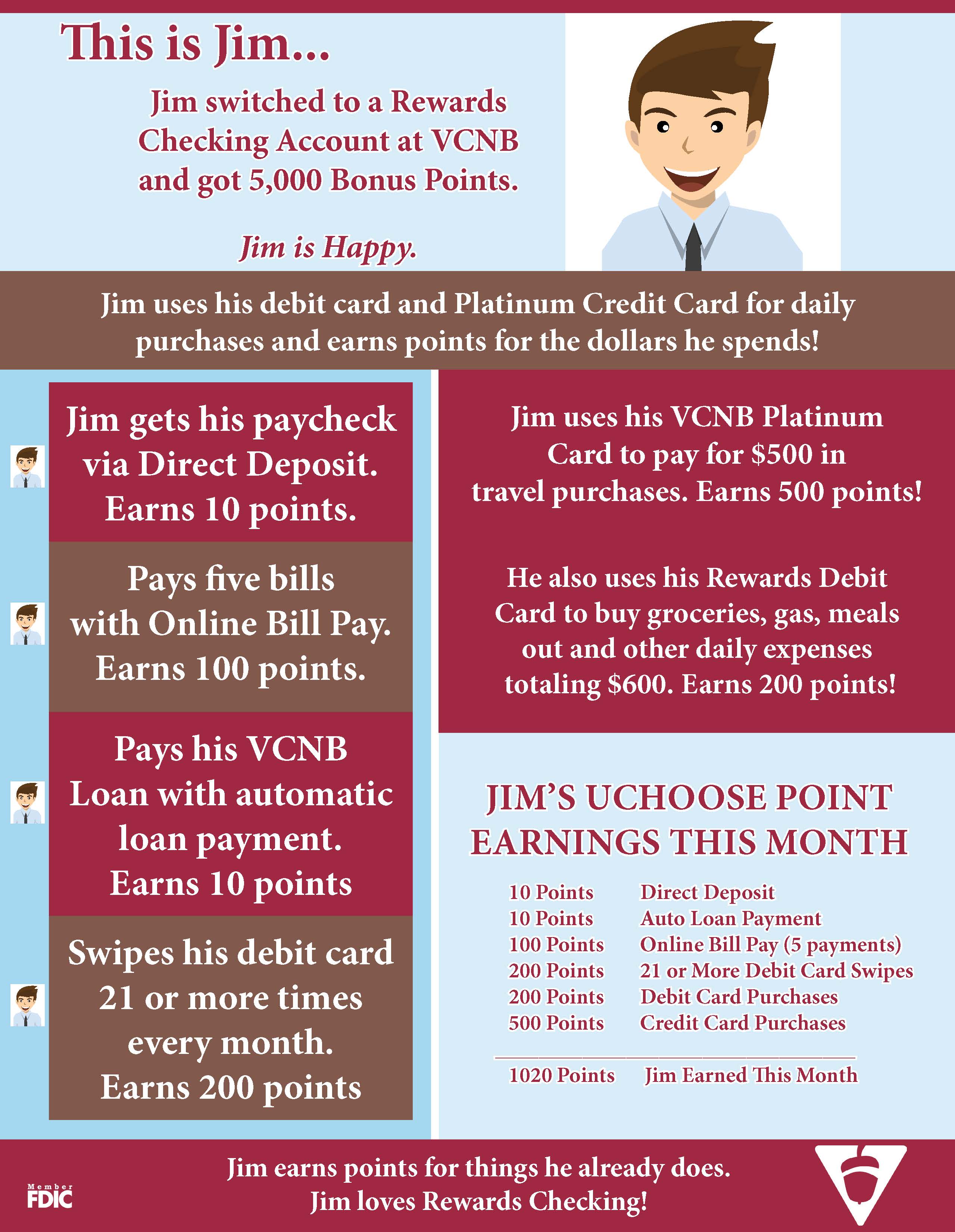
Get Rewards. Be Like Jim.

Today we’re looking at how an average customer might accumulate UChoose Rewards® Points with Rewards Checking at VCNB. Customers who are using this account say that it has been easy to earn points by simply doing what they already do in terms of spending and banking habits.

See below to meet Jim and learn how he earns points every month. Jim spends with his debit card and Visa® Platinum Card, uses Direct Deposit and other bank products. As a result, Jim sees his UChoose Rewards Point balance increasing steadily.

By signing up for Rewards Checking before December 31, 2015, Jim even receives 5,000 bonus points to kick start his point savings.

Visit http://www.vintoncountybank.com/rewardschecking/ to see full terms and conditions as well as fees associated with Rewards Checking.

Visit http://www.vintoncountybank.com/rewardschecking/ to see full terms and conditions as well as fees associated with Rewards Checking. Click image to enlarge.

Many of our customers and employees use Rewards Checking and have been thrilled with this new account. We encourage you talk to others who have Rewards Checking accounts and read up on the account by clicking here.

At this link you’ll find complete account details including ways to earn points, fees and other information you may find helpful. You can open a new account online or in office. If you are an existing VCNB customer, please contact your local office to have your account type changed.

What You Need To Apply For A Mortgage

You’ve found your dream home and now is the time to buy. Do you know what kind of information you will need when applying for a mortgage? Simplify the process by bringing the following information when you meet with your loan officer:

  • Tax returns or W2 forms from each employer from the last two years.
  • Residence addresses for the past two years.
  • Names and addresses of each employer for the past two years.
  • One month of recent pay stubs.
  • Most current bank statements.

Contact your local office to speak with one of our knowledgeable lenders. VCNB employs lenders who have vast experience with all kinds of home loans and who will be happy to guide you through the process.

Would you like to get a head start on the borrowing process? You can prequalify for a loan from the comfort of home. Click here to get started!

Increase rewards earning with Visa® Platinum Card

Customers who have signed up for our new Rewards Checking account at VCNB will be pleased to know that their rewards earning potential increases when they also use a VCNB Visa® Platinum card.

We are overwhelmed by the number of customers – both new and old – who have taken advantage of our new Rewards Checking. With Rewards Checking, customers earn UChoose® Rewards Points for their regular banking habits and for their daily spending. Rewards Checking customers who also have a Visa Platinum Credit Card can earn even more points every time they use this credit card.

In fact, customers earn one reward point for every dollar spent in purchases on a Visa Platinum Credit Card. Purchases made with a VCNB Rewards Debit Card earn one point for every three dollars spent.

It is easy to track Rewards Points through a customer account on the UChoose website and redeem them for merchant gift cards, cash back, travel, hotels, movie tickets, merchandise and more. To be most effective, the debit card and credit card should be registered to the same UChoose account so the points will accumulate faster.

Want to learn more about Rewards Checking and a special bonus we are offering now? CLICK HERE for details. Thinking about a Visa Platinum, need help with your UChoose account or have other questions? We would love to hear from you! Contact an Account Representative at your local VCNB office or call Customer Service at 1.800.542.5004. You can also chat with us from our website!

Small Business Spotlight: Modern Technology To Heirloom Gifts

We understand that being a small business owner is tough. That’s why we plan to spotlight a different business each month to help you learn about unique businesses in your own back yard.

Looking for a gift for that person who has everything? Look no further. Buckeye Designs and Engraving specializes in unique gifts. With inspiration from Uncle Wayne Barker’s experience in graphic design, Ben Barker used his project management skills to open Buckeye Designs and Engraving. Together they produce everything from personalized wine glasses for weddings to engraved watermelons for summer fairs. One of the most common requests they do is the personalization of people’s guns but they thrive on trying new ideas. They believe that the sky is the limit!

Buckeye Designs and Engraving uses advanced laser engraving technology to create personalized gifts and other items. Owner Ben Barker shows off the technology they use.

Using advanced laser engraving technology, Buckeye Designs and Engraving is able to create one of a kind personalized gifts for all occasions.  Their American made Epilog Laser system is able to etch intricate designs into wood, acrylic, plastic, marble, and much more. Attached to a computer just like a printer, the system will cut designs created in graphic design software into the medium of your choice using a CO2 laser beam.

Wayne Barker poses with a display of items in the showroom.

Family photos etched into marble, granite or wood make fantastic gifts. Wood plaques imprinted with sports teams can be displayed to show team spirit and custom pet tags can help guide your pets home should they roam off. Priding themselves on competitive pricing, this veteran owned and operated business also completes more standard business requests like nametags, nameplates and awards. So they really are a one-stop shop!

You can visit the showroom at 486 South Paint Street in Chillicothe to see a variety of their work. Hours of operation are Monday through Friday 10 a.m. -7 p.m. and weekends by appointment.

Find them on Facebook Here or call 740.851.3851.

It’s Good Neighbor Day!

Get to know your neighbors! Host a block party, a backyard cookout or just a playdate for the kids next door.

Get to know your neighbors! Host a block party, a backyard cookout or just a playdate for the kids next door.

Are you friendly with your neighbors? Do you even know who they are? There was once a time when folks commonly spent their evenings out on the porch, swapping stories and recipes across the fence. These days it’s almost uncommon to even know who lives next door.

Today is actually Good Neighbor Day, encouraging Americans to be, well…. good neighbors. But what does that mean? It means at least being respectful and considerate of the folks in your neighborhood. The best neighbors are the ones who are also thoughtful.

Need some inspiration?

Start out by talking to people. Say hello, ask how they are or just wave from a distance. If they’re new to the neighborhood, stop by and introduce yourself.

Once you know who they are consider doing something a little extra. Try organizing a neighborhood event like a yard sale, Christmas party, walking group or block party.

Take a look around and consider the folks around you. Is there a single mom who seems to be struggling? Invite her kids over for a play date so she can run to the store or finish chores. Is your neighbor elderly? Take their paper up to the house on bad weather days or offer to pick up something at the store when you go. Maybe they are a widower or a shut-in? Take them a home cooked meal once in a while. They might be really grateful for those leftovers you were about to throw in the fridge.

Keep an eye out for those who are sick or struggling. Take them soup or check in on them just to say hi and make sure they’re ok.

If the power goes out, make sure your neighbor has a way to stay warm or to cook until the electric comes back.

Want to make friends with someone or maybe just say thanks for being a good neighbor? Take them an unexpected gift. It need not be expensive – flowers from your garden or fresh cookies from the oven come to mind.

At minimum, being a good neighbor means respecting the people around you. Keep the noise down, especially between the hours of 9 p.m. and 9 a.m. No mowing, no hammering, no loud music when folks might be trying to sleep or just enjoy a quiet morning at home.

Respect their space. Don’t trespass or spy, gossip or meddle in their affairs. Be responsible for your pets, cleaning up after them and keeping them off your neighbor’s lawn.

Keep your home neat and well maintained. Keep your grass cut and trash picked up from your yard. Keep your sidewalk clean of snow, bicycles and other items that might make it difficult to walk. Shoveling your own sidewalk? Take a few minutes to do theirs as well.

Do you have a good neighbor? We would love to hear about them! Tell us about your good neighbor or about ways you try to be a good neighbor in the comments section below.